I built a thing. It’s called TalkKeys.
At its heart, it’s a desktop companion for Windows. It doesn’t try to take over your OS; it just floats in a small, unobtrusive window, waiting for you to tell it what to do.
It’s built for the joy of building. I saw other voice apps, got curious about how they worked, and decided to build my own playground. Currently, it has two main features, but since it’s a personal project, who knows what comes next.
Here is what it can do right now.
Feature 1: Dictation (Because Typing is So Last Century)
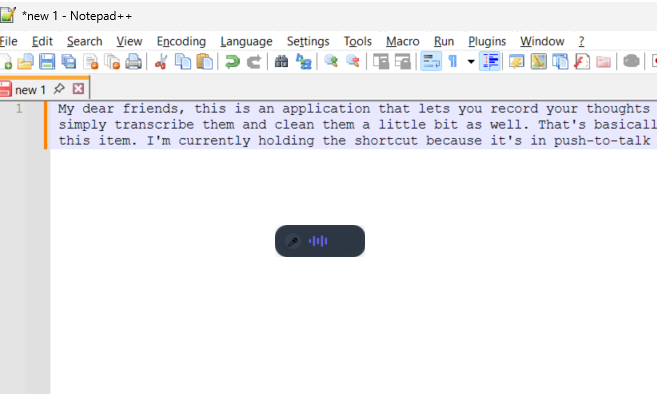
This is the bread and butter. You trigger it, you talk, and text appears.
How it works:
- Trigger: Press the shortcut (default is Ctrl+Shift+Space, but you can change it).
- Speak: The little window indicates it’s listening.
- Finish: Press the shortcut again.
The app thinks for a split second (powered by Groq’s API, so it’s fast), and then your words magically appear in your currently selected text field. If you prefer, you can also just grab the text directly from the TalkKeys window.
It works in Slack, Word, your browser, Notepad—basically anywhere you can type. Once you get used to the flow, typing feels surprisingly outdated.
Feature 2: The “WTF” Translator
We’ve all received that one email. You know the one—a twelve-paragraph essay that says absolutely nothing. Or a “quick update” that requires a PhD to decipher.
So I added a feature called WTF. (It stands for What are the Facts. Obviously.)
How it works: You select the text that is confusing you, trigger the feature, and TalkKeys gives you a translation.
It’s less of a dry academic summary and more of a “sanity check.” It cuts through the corporate fluff and gives you a fun, plain-English (and sometimes slightly sassy) translation of what the person is actually trying to say.
It’s a little bit of fun to keep you sane during the workday.
For the Tinkerers:The Remote Control API
This part wasn’t even my idea initially. A friend suggested I add a local API so he could integrate his own app with TalkKeys.
I realized that was a genuinely good idea, so I built it. TalkKeys exposes a local HTTP API, meaning you can trigger its features from external sources.
Whether you want to wire it up to a Stream Deck, run it from a script, or integrate it with your own tools, the door is open. It turns the app from a simple tool into an automation receiver.
Want To Try It?
I published it to the Windows Store. (I know, right? Felt very official.)
- Download: Grab it from the Store.
- Account: Sign in with Google and you’re good to go.
- The Cost: The AI calls are on me. Yes, I’m spending money so strangers can talk to their computers. No, I haven’t done the math on that. Don’t tell my wife.
Fair warning: It’s a personal project, not a startup. It works well for me. Your mileage may vary.